

Be Known, LLC in Knoxville, TN, has used Databox for client reporting for three years because it centralizes Meta, Google, Stripe, QuickBooks, and CRM data in one dashboard, eliminating manual exports and add-on costs, and Databox’s Genie AI now turns queries like “compare ad spend to lead growth” into visual reports in seconds, saving agencies up to 40 hours per month.
Key Takeaways
- Databox includes 130+ native connectors with no per-source fees
- Genie AI builds custom boards and analyses from natural-language prompts
- Agencies save up to 40 hours monthly on reporting tasks
- Genie runs on live data, not CSV exports or generic estimates
- Built for paid acquisition for coaches and consultants
Yes, Looker Studio is free. But the moment you need to connect Stripe, QuickBooks, or Ads Manager, you’re buying add-ons. Those add-ons stack up fast, and “free” isn’t free anymore. Databox gives you all the connectors in one place with no nickel-and-diming.
What We Track (And Why It Matters)
Most agencies lead with vanity metrics. “You got 440,000 impressions!” Great. What did that do for revenue? Your clients care about spend, profit, leads, and sales. That’s it.
We build Databox dashboards around:
- Revenue cash collected and gross profit vs. goal
- Ad spend across Meta, Google, and LinkedIn in one view
- MER and blended ROAS
- Sales calls booked, webinar registrations, and new leads (via Zapier from GoHighLevel)
Everything lives in one place. One source of truth. No toggling between platforms.
The Data Story Approach
We don’t just send a PDF with numbers. Every two weeks, we write a data story: what the numbers mean, what’s working, what we’re adjusting, and why.
Data without context is noise. Clients don’t know what to do with noise. Our reporting translates numbers into decisions. That takes time. Genie changes that.
Genie: Databox’s AI Analyst
Databox introduced Genie, a conversational AI analyst built into your workspace. You type a prompt. It pulls from your connected data and builds what you need.
I asked it to “build an Executive Summary Board with Revenue, Churn, and MRR” for a client. In seconds, it created a draft board I could customize. Then I queried month-over-month lead growth.
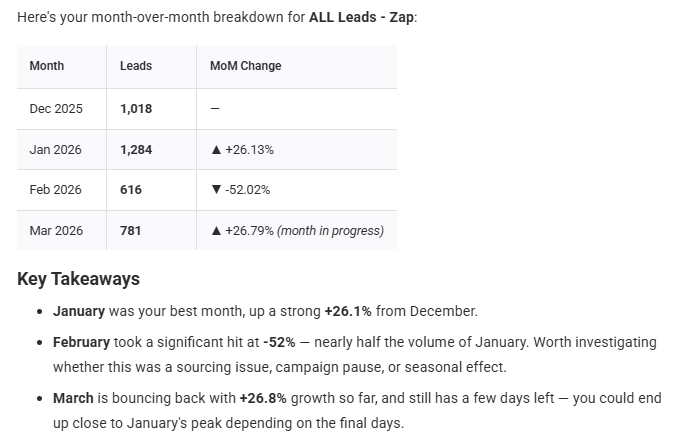
Next, I asked it to compare lead growth against total ad spend using our custom metric. It understood the context, asked a clarifying question when there were multiple lead sources, and built a clean comparison.


It’s not perfect every time. I’m the strategist. Genie is the tool. But it’s a useful tool that cuts down time on data analysis and building stories.
The Numbers Behind Why This Matters
Time savings in reporting is big. Databox case studies show agencies save up to 40 hours per month on client reporting. That’s a full work week back every month.
On the broader AI side, the data backs up what we see:
- 90% of marketers using AI report faster decision-making
- 81% say it helps uncover insights more quickly
- Teams implementing AI see an average 300% ROI
These aren’t theoretical. They reflect what we see: faster analysis, sharper reporting, and more time for strategy instead of spreadsheets.
What Makes Genie Different From ChatGPT
Why not export a CSV and ask ChatGPT? Here’s the difference: Genie is embedded in Databox. It has full context of your workspace, your metrics, and the relationships between them. It’s grounded in validated business data, not guesses.
ChatGPT is great. But you’d have to explain everything from scratch every time, and it approximates math rather than running actual numbers. Genie runs on your real data.
For agencies managing multiple client accounts, that distinction is everything.
The Connector Advantage
Genie is only as powerful as the data behind it. Databox gives you 130+ native integrations: HubSpot, Salesforce, Google Analytics, Meta Ads, LinkedIn, YouTube, ActiveCampaign, MailChimp, Stripe, QuickBooks, and more.
For anything outside the native list, you can connect via Zapier or Make. That’s how we pipe in CRM data from GoHighLevel for clients, including leads, call bookings, and pipeline stages.
The result: a complete picture in one reporting environment. No manual exports. No duct-taped integrations.
The Bottom Line
Reporting shouldn’t eat your week. And it shouldn’t leave clients staring at data they don’t understand.
Databox has always solved the centralization problem. Genie now solves the analysis and storytelling problem. That’s where real time gets freed up.
If you run a service business or manage marketing for high-ticket clients and you’re still cobbling together reports manually, this is worth a look. The tools have caught up to the workload. Learn how we help coaches and consultants scale paid acquisition systems that feed these dashboards with real pipeline data.
Keep reading: see all of our business automation & systems guides, or talk with us about your own setup.
Frequently Asked Questions
- How much does Databox cost?
- Databox offers a free tier for up to three data sources. Paid plans start at $47/month for ten sources and scale based on connectors and users. Unlike Looker Studio add-ons, all native integrations are included in your plan tier.
- Can Genie AI replace a marketing analyst?
- No. Genie speeds up data retrieval and visualisation, but it doesn’t replace strategic judgment. You still interpret findings, decide on tests, and guide client decisions. Think of it as a research assistant, not a substitute strategist.
- Does Databox integrate with GoHighLevel?
- Yes, via Zapier or Make. You can pipe in leads, call bookings, pipeline stages, and custom events. We use this setup for clients running webinar funnels or appointment-based sales processes.
- What’s the difference between Databox and Looker Studio?
- Looker Studio is free but requires paid connectors for most business tools (Stripe, QuickBooks, CRMs). Databox includes 130+ native integrations in your plan, plus you get Genie AI, automated alerts, and goal tracking built in.
- How long does it take to set up a Databox dashboard?
- A basic dashboard with three to five data sources takes 20 to 30 minutes. With Genie, you can build a draft executive summary in under two minutes by typing “create a board with revenue, MRR, and ad spend.”
- Is Genie AI available on all Databox plans?
- Genie is available on Databox’s Professional and higher plans. Check their pricing page for the latest tier details, as features and limits change periodically.
- Can I use Databox for multiple clients?
- Yes. Databox offers agency plans that let you manage multiple client workspaces under one account. Each client gets a separate dashboard with isolated data. You can share reports via secure links or schedule automated delivery.